SPSTEAMPULSELIVE ANALYTICS
Stop Sign VR Tools

Stop Sign VR Tools Steam metadata

Reality Inside Ltd. | Dec 17, 2019 | game

Released

0players observed · 22 September 2026 - 16:56:31 UTC

ActionIndieSportsEarly AccessSteam Store

  • Latest observed playersNot available
  • SteamPulse tracked peak25
  • Units sold (VGI)1,920
  • Revenue (VGI)$8,523
  • Review score86% positive

Stop Sign VR Tools metadata records Steam app facts, developer and publisher details, platform support, store categories, language support, and reference links.

  • Latest observed playersNot available
  • SteamPulse tracked peak25
  • Units sold (VGI)1,920
  • Revenue (VGI)$8,523
  • Review score86% positive
  • Total reviews63
  • Release dateDec 17, 2019
  • DeveloperReality Inside Ltd.
  • PublisherReality Inside Ltd.

Genres: Action, Indie, Sports, Early Access

Company pages: Developer: Reality Inside Ltd.Publisher: Reality Inside Ltd.

Top Steam chartsTop 100 gamesGame directorySteam Store page

Stop Sign VR Tools Steam metadata

Stop Sign VR Tools metadata records Steam app facts, developer and publisher details, platform support, store categories, language support, and reference links.

References

Official and third-party reference links for checking this Steam app outside SteamPulse.

ReferenceLink
SteamPulse canonicalhttps://steampulse.org/game/1196450/metadata
Steam Storehttps://store.steampowered.com/app/1196450/
Steam Communityhttps://steamcommunity.com/app/1196450
PCGamingWiki search
IGDB searchSearch IGDB for Stop Sign VR Tools

Reviews, pricing, and metadata

Review summary

Very Positive

86% positive, 54 positive, 9 negative

Price and discount

$5.99

Platforms

Windows

Categories

Single-player, Tracked Controller Support, VR Only, Family Sharing

Achievements

Not available

Platform releases
  • Steam 17 December 2019

Latest Steam announcements

  • Signup to mailing list - 22 June 2022

    Signup for emails about new features, betas, discounts, price change announcements and other news about VR apps by Reality Inside: Reality Mixer Cam Circle VR Stop Sign VR Tools more to come... You'll get an email only sporadically and your address won't be used for anything else. Signup here.

  • Small update: Boundary++ Max Segment Length - 9 June 2022

    This update introduces a maximum Boundary++ segment length. Larger boundaries are split into several segments. This improves the visual quality of the boundary when used with (very) large play areas.

  • Fix for Quest play area problems in SteamVR - 2 May 2022

    When using a Meta Quest connected to a PC using (Air) Link and playing a game in SteamVR, you may experience misaligned play spaces or SteamVR play areas that are larger than your physical room. Games that rely on correct play areas can become unplayable, which is the case with e.g. The Thrill of the Fight. Stop Sign VR Tools has a feature to correct this Quest+SteamVR problem. Just tick this checkbox: Auto find largest play area rectangle on startup + fix WMR & Quest play area Or press the button "Recalc play rectangle". Please note: Quest and Oculus app on PC must be on version 39.

  • A few updates - 9 February 2022

    A few updates: "Recalc play area" now finds the largest play area rectangle that fits within your boundaries, irrespective of your orientation and position. It can be set to find the largest rectangle at startup. For Mixed VR systems, such as WMR headsets using Index controllers, this fixes the play area rectangle in SteamVR. This is especially useful for games such as Thrill of the Fight. The LIV Virtual Camera is now excluded from generating impact alerts and proximity warnings. You can configure for each box whether it ignores controllers, so it will only fade-in and alert for the headset. Use it for boxes around low height objects that you won't hit with your controllers, such as a bed, couch, a low table, etc. You will still see the box when you are near it because the headset comes close. A memory leak in Boundary++ has been fixed that showed up after playing for a long time. (Spe…

  • Closing SteamVR Dashboard Using the Keyboard + a small fix - 9 November 2021

    Hi people, This update consists of one small new feature and a small fix (memory leak). Ctrl-C-C-C closes dashboard: Hit ctrl-C quickly three times to close the SteamVR dashboard. Especially useful when using Windows Mixed Reality headsets without controllers.

  • Accuracy improvements for Cam Circle - 30 September 2021

    This update improves the mapping of the real world into the virtual one, when using Cam Circle. Stereo 3D overlap is now near perfect on Valve Index headsets. On Vive Pro the stereo mapping accuracy has also improved significantly. Even the original Vive now maps the real world better into VR. Try it with the Cam Circle at arm's length and hold a controller on the portal edge:

  • New feature: Cam Circle - quickly see what's going on around you, in full color - 22 June 2021

    Update: The Camera Circle feature is now available for everybody. (Previously, it was in beta.) Use it for quick looks outside the headset or for picking up the controllers after putting on the headset. Cam Circle can auto-start when it detects you're wearing the headset. On a Vive Pro and Index the pass-through video can be in 3D. On a Vive it's monoscopic (2D). All Cam Circle options can be set by a few checkboxes on the SteamVR dashboard page. Start Cam Circle manually either by double tapping the headset or by pressing both grip buttons simultaneously.

  • Cam Circle - this new feature can be tested - 1 May 2021

    Cam Circle gives you quick and easy access to the headset camera. Just double tap the headset gently on the side to start a portal into the real world. Alternatively, you can activate Cam Circle by pressing the grip buttons on both controllers. Deactivate it in the same way. Please make sure the camera is enabled in SteamVR Settings. On Windows 10 your privacy settings must allow access to the camera. Click Start - Settings - Privacy - Camera. I'm looking for feedback and ideas for improvement of this feature. Cam Circle is part of Stop Sign VR. It is currently in beta. Choose the cam_circle beta branch (in your Steam library) to get access to this beta.

  • Boxes can now show other (external) overlays, such as fpsVR. - 9 March 2021

    StopSignVR boxes can now show dynamic content from other overlay apps such as fpsVR. The boxes act as usual, including fading out when you move away from them, and (if you want) alerting you with a stop sign. There's one new configuration option for the boxes that's called "Look-at-me". When switched on, that box will continuously turn its front side to the user. When a box is configured to show dynamic content from another app, such as fpsVR, the Look-at-me feature makes it easy to quickly glance at the fpsVR data. You could, for instance, place the box above your play space, against the ceiling. Steps to take: Setup StopSignVR as usual. Use the Settings Editor in Windows to select a box skin for the box you want to show the dynamic content. Choose a filename that starts with "BoxSkin_dynamic", e.g. "BoxSkin_dynamic_sb.fpsVR.ingameoverlay.png". If you want the Look-at-me feature, switc…

  • Start StopSignVR when SteamVR is not yet running - 17 February 2021

    After this small update you can start Stop Sign VR when SteamVR is not yet running. Stop Sign VR will start SteamVR. This is useful for users who sometimes want to run SteamVR without and sometimes with Stop Sign VR (and Boundary++). If you want to use it that way, make sure to set "Auto launch with Steam VR" to "No" using the Settings Editor in Windows. Otherwise it will configure itself to start with SteamVR next time SteamVR is started. See screenshot below. For example, Windows Mixed Reality (WMR) users can have two icons in their WMR Portal home: The SteamVR icon, to start SteamVR without Stop Sign VR, and the Stop Sign VR icon, to run SteamVR with Stop Sign VR.

  • MixedVR grey screen fix and a few small updates (v.0.10.2.0) - 9 February 2021

    StopSignVR / Boundary++ has been updated with: A grey screen fix for seated games on Mixed VR sets such as an HP G2 headset with Valve Index controllers. Seated games like Moss, Hellblade: Senua's Sacrifice, DCS (Digital Combat Simulation), Apollo 11 VR and BigScreen VR would suffer from grey screens after starting. Tick the checkbox for the fix on the Boundary++ tab on Stop Sign VR's dashboard page and these and other seated games will run fine. Use the buttons for resetting the seated position on that same page when playing a seated game on a Mixed VR set. Small updates: By default, the Boundary++ grid activation distance is the distance you set for SteamVR's chaperone. Using the Settings Editor in Windows you can now set a fixed activation distance for Boundary++, independent from SteamVR's. Grid diameter multiplier: Increase this value using the Settings Editor in Windows to have a…

  • Small updates for Boundary++ - 23 December 2020

    StopSignVR / Boundary++ has been updated with: Boundary++: The amount of 'view blocking' is now configurable using the Settings Editor (the 'max opaqueness' settings). This is useful if you want to be able to see through the grid when a controller or headset is really close to the boundary. Boundary++: An Activation Distance Multiplier has been implemented. This allows for the default chaperone grid to come up earlier or later than Boundary++. Note that Boundary++ uses the activation distance configured for the SteamVR chaperone, multiplied by this new setting. (You can still turn off the default chaperone completely). Space Drag and similar features of other apps will not put the boxes in Edit Mode anymore. Some Pimax and Linux (work in progress) fixes. Currently, there's a 20% Winter Sale discount!

  • Nominate Stop Sign VR / Boundary++ for a Steam Award - 30 November 2020

    Okay, Stop Sign VR is not itself a game, but it is used with games. It's the VR application that makes the most innovative use of SteamVR overlays. For lack of a better VR award category (there's only one), please nominate Stop Sign VR for best VR Game of the Year. It will help the continuing development of the app! Thank you very much.

  • Introducing Boundary++ : a new VR warning grid system - 25 November 2020

    Take a look at Boundary++, a new feature of Stop Sign VR. Boundary++: a new warning grid system that will show up when you approach your walls and ceiling, works with native SteamVR headsets, WMR headsets and Oculus PC connected headsets, automatically imports the WMR Boundaries when using a Windows Mixed Reality headset, automatically imports the Oculus Guardian when using an Oculus PC headset, will not light up the whole play area, but will only show where you are actually near your boundaries, also alerts for the ceiling, using the same grid as for the walls, can be used with play areas of all sizes, even in very small rooms and Standing Only play areas, takes the ceiling height from the Wall Height setting configured in SteamVR Settings - Play Area, takes its activation distance and size from the Activation Distance setting configured in SteamVR Settings - Play Area, uses for its gr…

  • Stop Sign VR update: Recenter fix and active box side indicator - 27 July 2020

    The “reset standing position” button on the SteamVR dashboard allows users to adjust standing position and orientation for the current SteamVR session. Unfortunately, it also caused a displacement of StopSignVR's boxes. This update fixes that and keeps the boxes in place during and after a “standing position reset”. This update also introduces a small feature: When editing the size and position of boxes it will visually indicate the closest side, which is the side you will pull on when resizing. Any questions or ideas? Please reach out!

  • Update: Heads-Up Display (HUD) and dashboard settings UI - 14 June 2020

    Today's update introduces a few new features: Stop Sign VR now includes a Heads-Up Display (HUD) showing a vignette in your peripheral vision when a proximity warning or predicted impact occurs out of view. You will get a visual alert even when the object or wall boundary is to your side or behind you. The main features of the app can now be turned on and off using the dashboard in VR. Changes happen instantly. More detailed configuration options are still accessible using the Settings Editor in the Windows System Tray. For ceiling protection it uses the ceiling height as defined by the chaperone height in SteamVR Settings. There's an extra setting per box called "Ignore Headset Distance For Fade In". It's useful for play areas with low ceilings where you want to protect e.g. a ceiling light but you don't want the box to show up when you're standing under it. The controllers still trigg…

  • Stop Sign VR includes Settings Editor - 31 March 2020

    Stop Sign VR has been updated to include a Settings Editor. This Settings Editor runs in Windows, not in VR. There's an icon in the Windows System Tray, next to the clock, to open the Settings Editor. Please see the image at the bottom. It can be used to edit all settings, such as what sounds to use, whether or not to alert for ceiling impacts, the sensitivity of the prediction algorithm, etc. You can also add, remove and edit boxes using the Settings Editor. E.g. you can change the image to use on the sides, configure the distances when the boxes fade out and whether the boxes cause proximity alerts and/or impact warnings. This is configurable for each box separately. Most changes will be active a few seconds after you save the changes. For some, a restart of the Stop Sign VR app may be required. (E.g. turning on or off the SteamVR play area center marker.) The maximum number of boxes…

  • Stop Sign VR Updated - 0.7.2.0 - 28 January 2020

    The Stop Sign VR main branch has been updated with the changes listed below. If you encounter any problems, please reach out. After the update, you will have to re-position the boxes. (Future updates won't require that.) Changes: Works with 'hybrid setups' such as WMR headset + Index controllers, when using the third party SpaceCalibrator software. Configure a startup delay for StopSignVR to give SpaceCalibrator time to setup the universe. Changes previously included in beta 0.7.1.6 are now included in this main branch version: Two extra skins are available: BoxSkin_GridOrange and BoxSkin_CoasterCork. Maximum number of boxes has been increased to 5. Maximum box volume and dimension has been increased to 1.0 m³ and 5.0 m. Biggest flat box you can make is 5 x 5 meters, and 2 to 4 centimeters thick. Using 5 big flat boxes the whole play area and ceiling can be covered. Useful when the stan…

  • StopSignVR Beta Updated - 0.7.1.4 - 7 January 2020

    The StopSignVR beta has been updated with the following changes. Two extra skins are available: BoxSkin_GridOrange and BoxSkin_CoasterCork. Maximum number of boxes has been increased to 5. Maximum box volume and dimension has been increased to 1.0 m³ and 5.0 m. Biggest flat box you can make is 5 x 5 meters, and 2 to 4 centimeters thick. Using 5 big flat boxes the whole play area and ceiling can be covered. Useful when the standard bounds system is not adequate for your use case (e.g. WMR users on SteamVR). Vaulted ceilings and tilted walls can be covered with these big flat boxes as well. Minimum box volume and dimension has been reduced to 1 dm³ and 2 cm; e.g. 25 x 20 x 2 cm. New setting ImpactPredictionSensitivity: 0 to 9.99; 0 = off, no alerts; 9.99 = very sensitive. Different rooms (play areas) remember their own settings and boxes. This is useful if the VR set is used in different…
Patch notes and updates

S.noRelease datePatch nameGID number
19 June 2022Small update: Boundary++ Max Segment Length4480532686348339233
22 May 2022Fix for Quest play area problems in SteamVR4348798430289395303
39 November 2021Closing SteamVR Dashboard Using the Keyboard + a small fix4186653398789018997
417 February 2021Start StopSignVR when SteamVR is not yet running4059402835306714704
523 December 2020Small updates for Boundary++3917534300069710679
627 July 2020Stop Sign VR update: Recenter fix and active box side indicator3978319116851487888
731 March 2020Stop Sign VR includes Settings Editor2984138620263953107
828 January 2020Stop Sign VR Updated - 0.7.2.02597949245066441362
97 January 2020StopSignVR Beta Updated - 0.7.1.42592316573916682262

Complete SteamPulse Game Data

Full game metadata

FieldValue
Steam app typegame
Steam App ID1196450
Live current players0
SteamPulse tracked peak25
Live count (today's peak floor)0
Price$5.99
Free to playNo
Discount0%
Original price USD$5.99
Current price USD$5.99
Release dateDec 17, 2019
DeveloperReality Inside Ltd.
PublisherReality Inside Ltd.
Owners estimatedNot available
SteamSpy owner estimate minimumNot available
SteamSpy owner estimate maximumNot available
Review typeVery Positive
Positive review percent86%
Positive reviews54
Negative reviews9
Total reviews63
Steam recommendationsNot available
AchievementsNot available
Average playtime foreverNot available
Windows supportYes
macOS supportNo
Linux supportNo
Parent gameNot available
Store URLhttps://store.steampowered.com/app/1196450/

Short description

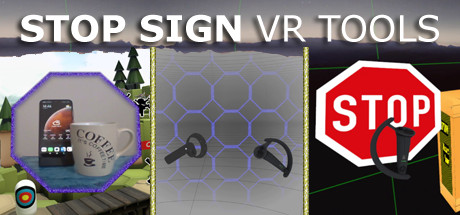
A set of tools that run in VR while you play a game: Cam Circle shows the real world in a circle in front of you. Activate it by double tapping the headset or by pressing both grip buttons. Boundary++ is a warning system showing your walls and ceiling. Boxes warn you for impacts with real objects.

About this game

Stop Sign VR Tools has grown into a set of tools that run while you play a SteamVR game. Each tool can be enabled and configured separately. Currently, there are four main tools and a few extras: Cam Circle uses the headset cameras to show a live view of the real world in a circle in front of you. It has easy shortcuts and activates almost instantly. You can activate Cam Circle by double tapping the headset , or by pressing both grip buttons at the same time. Cam Circle is very useful for quick looks outside the headset and for picking up the controllers after putting on the headset. You can even set it to automatically activate when you put on the headset. If you use an Index or Vive Pro, Cam Circle can show the pass-through video in 3D . On a Vive it's monoscopic (2D). Cam Circle is not (yet) available for WMR or Oculus headsets. Boundary++ is a new warning grid system that will show up when you approach your walls and ceiling. It works with native SteamVR headsets, Windows Mixed Reality (WMR) headsets, Oculus PC connected headsets and 'Mixed VR' sets (e.g. a WMR headset with Valve Index controllers). It will automatically import the WMR boundaries or Oculus Guardian (when using a Rift-S). Boundary++ will not light up the whole play area, but it will only show where you are actually near your boundaries. It can be used together with the default SteamVR chaperone, or just by itself. Warning Boxes are virtual boxes that you place around your valuable real equipment, such as TVs, ceiling fans, room lighting and so on. They help you avoid hitting real stuff in and around your VR play area. While you are playing a game a prediction algorithm warns you of possible impacts using sound, images and haptic feedback. The boxes will fade out when you move away from them. The fade-out and full-visibility distances can be configured for each box separately. If you can't find your boxes because they're faded out, press the system button and look around. The HUD is a Heads-Up Display that will show up when you are moving backwards into a wall or other boundary object, such as a Warning Box . Extras and other info: A box can be configured to show content by other overla…

Supported languages

English

Steam categories

Category IDCategory
2Single-player
52Tracked Controller Support
54VR Only
62Family Sharing

Regional ratings

BoardRatingDescriptors
dejuslNot available

Steam marketplace comparison data

Price History Overview

USD uses SteamPulse's own locally recorded daily store snapshots, so this overview reflects the exact regional price history that SteamPulse has captured for this currency.

Coverage And Tracking Window

  • Snapshots: 1
  • Coverage: Sep 22, 2026 to Sep 22, 2026
  • Lowest observed: $5.99
  • Highest observed: $5.99

Stop Sign VR Tools's USD price history spans from Sep 22, 2026 to Sep 22, 2026, with 1 recorded snapshot across 1 calendar day. Each row records the available final price, listed base price, and discount metadata for that observation. Within this coverage the lowest recorded price is $5.99, the highest is $5.99, and the first visible tracked price is $5.99. These comparisons apply only to the snapshots SteamPulse holds; missing observations can contain changes that are not represented here.

For USD, SteamPulse uses locally captured regional storefront snapshots and does not reconstruct older prices with exchange-rate conversion. The chart and table show the values recorded for this exact currency from the stated coverage start. Additional snapshots extend that record, but they do not fill unobserved days or prove what the storefront displayed between observations.

Discount Windows And Sale Timing

  • Discount windows: 0
  • Discounted days: 0 days
  • Deepest markdown: No discount tracked
  • Latest sale window: No sale window tracked

Stop Sign VR Tools's tracked USD rows do not contain a discount window. This means no available snapshot in the stated coverage has usable discount metadata; it does not prove that the game was never discounted. Missing snapshots or archived rows without complete metadata can hide a sale, so SteamPulse does not infer pricing strategy from this absence.

If a later snapshot includes discount metadata, it will appear here with its recorded depth, price, date, and sale name when available. Until then, this section should be read only as a description of the available rows, not as evidence about the publisher's promotion policy.

Observed Price Changes And Stable Runs

  • Observed price drops: 0
  • Observed price rises: 0
  • Longest stable run: 1 day of uninterrupted daily tracking
  • Current run: 1 day of uninterrupted daily tracking

Outside rows carrying discount metadata, the tracked price has not recorded a separate price rise or drop yet. That means the observed undiscounted level has stayed stable across the snapshots SteamPulse currently holds. This is a statement about the recorded coverage only; it does not prove that an older or missing price change never happened.

The longest unchanged price stretch in the current record lasts 1 day of uninterrupted daily tracking at $5.99, from Sep 22, 2026 through Sep 22, 2026. Among rows without discount metadata, the longest unchanged run lasts 1 day of uninterrupted daily tracking at $5.99. The latest run records $5.99 for 1 day of uninterrupted daily tracking as the same recorded undiscounted price. Run lengths describe consecutive stored observations only and do not establish that a price is permanent.

Latest Snapshot And Sales Context

  • Current price: $5.99
  • Current list price: $5.99
  • Distinct observed prices: 1
  • Source mode: SteamPulse local tracking

The latest tracked snapshot records Stop Sign VR Tools at $5.99 in USD, with no active discount metadata. Across the available history SteamPulse has recorded 1 distinct final price in this currency. This supports comparisons with the lowest, highest, and most common values present in the retained record, subject to the stated coverage limits.

The live sales view and Steam sales record provide calendar context for these dates. A date overlap can be compared with a named Steam event, but it does not prove why a publisher changed a price. As new daily rows arrive, this overview recalculates its observed prices, discount windows, and run lengths automatically.

Regional Steam prices

CountryCurrencyFinal priceOriginal priceDiscount
United StatesUSD$5.99$5.990%
United KingdomGBNot availableNot availableNot available
Euro AreaEUNot availableNot availableNot available
AustraliaAUNot availableNot availableNot available
CanadaCANot availableNot availableNot available
IndiaINNot availableNot availableNot available
BrazilBRNot availableNot availableNot available
RussiaRUNot availableNot availableNot available
ChinaCNNot availableNot availableNot available
JapanJPNot availableNot availableNot available
South KoreaKRNot availableNot availableNot available
MexicoMXNot availableNot availableNot available
NorwayNONot availableNot availableNot available
PolandPLNot availableNot availableNot available
SwitzerlandCHNot availableNot availableNot available
New ZealandNZNot availableNot availableNot available
SingaporeSGNot availableNot availableNot available
Hong KongHKNot availableNot availableNot available
South AfricaZANot availableNot availableNot available
UkraineUANot availableNot availableNot available
KazakhstanKZNot availableNot availableNot available
IndonesiaIDNot availableNot availableNot available
ThailandTHNot availableNot availableNot available
MalaysiaMYNot availableNot availableNot available
PhilippinesPHNot availableNot availableNot available
VietnamVNNot availableNot availableNot available
United Arab EmiratesAENot availableNot availableNot available
Saudi ArabiaSANot availableNot availableNot available
IsraelILNot availableNot availableNot available
ChileCLNot availableNot availableNot available
ColombiaCONot availableNot availableNot available
Costa RicaCRNot availableNot availableNot available
KuwaitKWNot availableNot availableNot available
PeruPENot availableNot availableNot available
QatarQANot availableNot availableNot available
TaiwanTWNot availableNot availableNot available
UruguayUYNot availableNot availableNot available
ArmeniaAMNot availableNot availableNot available
ArgentinaARNot availableNot availableNot available
TurkeyTRNot availableNot availableNot available
PakistanPKNot availableNot availableNot available

Tracked regional price history

The tracked Steam price is stable at $5.99.

CountryCurrencySnapshotsFirst trackedLatest trackedChangeLatest discount
United StatesUSD1$5.99$5.99No changeNo discount
United KingdomGB0Not tracked yetNot availableTracking starts nowNo discount
Euro AreaEU0Not tracked yetNot availableTracking starts nowNo discount
AustraliaAU0Not tracked yetNot availableTracking starts nowNo discount
CanadaCA0Not tracked yetNot availableTracking starts nowNo discount
IndiaIN0Not tracked yetNot availableTracking starts nowNo discount
BrazilBR0Not tracked yetNot availableTracking starts nowNo discount
RussiaRU0Not tracked yetNot availableTracking starts nowNo discount
ChinaCN0Not tracked yetNot availableTracking starts nowNo discount
JapanJP0Not tracked yetNot availableTracking starts nowNo discount
South KoreaKR0Not tracked yetNot availableTracking starts nowNo discount
MexicoMX0Not tracked yetNot availableTracking starts nowNo discount
NorwayNO0Not tracked yetNot availableTracking starts nowNo discount
PolandPL0Not tracked yetNot availableTracking starts nowNo discount
SwitzerlandCH0Not tracked yetNot availableTracking starts nowNo discount
New ZealandNZ0Not tracked yetNot availableTracking starts nowNo discount
SingaporeSG0Not tracked yetNot availableTracking starts nowNo discount
Hong KongHK0Not tracked yetNot availableTracking starts nowNo discount
South AfricaZA0Not tracked yetNot availableTracking starts nowNo discount
UkraineUA0Not tracked yetNot availableTracking starts nowNo discount
KazakhstanKZ0Not tracked yetNot availableTracking starts nowNo discount
IndonesiaID0Not tracked yetNot availableTracking starts nowNo discount
ThailandTH0Not tracked yetNot availableTracking starts nowNo discount
MalaysiaMY0Not tracked yetNot availableTracking starts nowNo discount
PhilippinesPH0Not tracked yetNot availableTracking starts nowNo discount
VietnamVN0Not tracked yetNot availableTracking starts nowNo discount
United Arab EmiratesAE0Not tracked yetNot availableTracking starts nowNo discount
Saudi ArabiaSA0Not tracked yetNot availableTracking starts nowNo discount
IsraelIL0Not tracked yetNot availableTracking starts nowNo discount
ChileCL0Not tracked yetNot availableTracking starts nowNo discount
ColombiaCO0Not tracked yetNot availableTracking starts nowNo discount
Costa RicaCR0Not tracked yetNot availableTracking starts nowNo discount
KuwaitKW0Not tracked yetNot availableTracking starts nowNo discount
PeruPE0Not tracked yetNot availableTracking starts nowNo discount
QatarQA0Not tracked yetNot availableTracking starts nowNo discount
TaiwanTW0Not tracked yetNot availableTracking starts nowNo discount
UruguayUY0Not tracked yetNot availableTracking starts nowNo discount
ArmeniaAM0Not tracked yetNot availableTracking starts nowNo discount
ArgentinaAR0Not tracked yetNot availableTracking starts nowNo discount
TurkeyTR0Not tracked yetNot availableTracking starts nowNo discount
PakistanPK0Not tracked yetNot availableTracking starts nowNo discount

United States price history (USD)

Tracked price is stable at $5.99.

DateCurrent priceOriginal priceDiscountSource
2026-09-22$5.99$5.99No discountSteam Store

Related Steam games by tag and genre

Action

GameLatest observed playersTracked peakReviewsDeveloper
Counter-Strike 2621,82822 September 2026 - 22:28:49 UTC1,818,3689,826,471Valve
Dota 2474,36222 September 2026 - 22:28:49 UTC1,291,3282,758,031Valve
WARDOGS259,20822 September 2026 - 16:14:29 UTC399,748Not availableBULKHEAD
Apex Legends™232,32422 September 2026 - 13:05:08 UTC624,4731,047,228Respawn
Valheim120,04522 September 2026 - 13:05:08 UTC498,478533,888Iron Gate AB
PUBG: BATTLEGROUNDS118,87122 September 2026 - 22:28:49 UTC3,236,0272,744,193PUBG Corporation
Delta Force111,76722 September 2026 - 13:05:09 UTC246,418192,933Team Jade
Aniimo105,64022 September 2026 - 12:42:24 UTC111,475Not availablePawprint Studio
Rust77,21922 September 2026 - 20:58:27 UTC259,6461,359,516Facepunch Studios
The Binding of Isaac: Rebirth76,26922 September 2026 - 14:56:02 UTC156,156391,633Nicalis, Inc., Edmund McMillen
Marvel Rivals75,33722 September 2026 - 22:20:36 UTC642,333409,518NetEase Games
Tom Clancy's Rainbow Six Siege69,21722 September 2026 - 21:32:24 UTC200,4761,547,383Ubisoft Montreal

Indie

GameLatest observed playersTracked peakReviewsDeveloper
WARDOGS259,20822 September 2026 - 16:14:29 UTC399,748Not availableBULKHEAD
Bongo Cat168,45222 September 2026 - 15:18:21 UTC193,859108,446Marcel Zurawka, Julius Krüger
Valheim120,04522 September 2026 - 13:05:08 UTC498,478533,888Iron Gate AB
Rust77,21922 September 2026 - 20:58:27 UTC259,6461,359,516Facepunch Studios
TBH: Task Bar Hero71,85022 September 2026 - 19:30:43 UTC546,13043,714Nugem Studio, Tesseract Studio
Project Zomboid53,78522 September 2026 - 20:05:07 UTC122,811467,999The Indie Stone
Slay the Spire 250,28122 September 2026 - 18:09:08 UTC574,638199,438Mega Crit
Palworld46,67922 September 2026 - 22:13:20 UTC2,101,535451,088Pocketpair
Wallpaper Engine42,89522 September 2026 - 21:12:53 UTC150,2711,008,495Wallpaper Engine Team
Stardew Valley42,53622 September 2026 - 18:00:02 UTC236,6141,016,067ConcernedApe
Geometry Dash37,02422 September 2026 - 22:22:31 UTC108,707590,977RobTop Games
tModLoader31,75725 July 2026 - 06:44:20 UTC78,825365,372TML Team

Sports

GameLatest observed playersTracked peakReviewsDeveloper
VRChat48,27522 September 2026 - 17:27:51 UTC74,217261,953VRChat Inc.
EA SPORTS FC™ 2637,94822 September 2026 - 20:49:30 UTC159,35063,186EA Canada, EA Romania
Football Manager 2632,31522 September 2026 - 13:05:09 UTC82,75035,608Sports Interactive
Rocket League®28,82222 September 2026 - 19:31:03 UTC146,902579,707Psyonix LLC
eFootball™18,78022 September 2026 - 20:12:56 UTC33,925108,764KONAMI
Football Manager 202416,50522 September 2026 - 16:09:31 UTC88,89428,373Sports Interactive
Russian Fishing 414,99522 September 2026 - 19:02:39 UTC27,90689,773FishSoft LLC
Forza Horizon 610,57622 September 2026 - 21:15:09 UTC302,64594,239Playground Games
NBA 2K279,31922 September 2026 - 21:42:17 UTC31,139Not availableVisual Concepts
Assetto Corsa7,63922 September 2026 - 01:13:40 UTC20,019169,192Kunos Simulazioni
Umamusume: Pretty Derby6,00922 September 2026 - 20:19:18 UTC50,16755,753Cygames, Inc.
REMATCH5,41222 September 2026 - 21:32:29 UTC57,36351,620Sloclap

Early Access

GameLatest observed playersTracked peakReviewsDeveloper
WARDOGS259,20822 September 2026 - 16:14:29 UTC399,748Not availableBULKHEAD
Valheim120,04522 September 2026 - 13:05:08 UTC498,478533,888Iron Gate AB
Project Zomboid53,78522 September 2026 - 20:05:07 UTC122,811467,999The Indie Stone
Slay the Spire 250,28122 September 2026 - 18:09:08 UTC574,638199,438Mega Crit
VRChat48,27522 September 2026 - 17:27:51 UTC74,217261,953VRChat Inc.
Palworld46,67922 September 2026 - 22:13:20 UTC2,101,535451,088Pocketpair
Path of Exile 240,86022 September 2026 - 21:33:06 UTC578,562209,717Grinding Gear Games
RuneScape: Dragonwilds24,14722 September 2026 - 22:10:33 UTC39,10324,686Jagex Ltd
ARK: Survival Ascended21,58122 September 2026 - 12:46:09 UTC98,047115,415Studio Wildcard, Grove Street Games, Instinct Games
BeamNG.drive17,07522 September 2026 - 20:56:27 UTC44,232392,944BeamNG
The Isle15,55522 September 2026 - 21:55:48 UTC27,916111,695Afterthought LLC
R.E.P.O.13,48122 September 2026 - 22:03:59 UTC266,908420,693semiwork

Interactive charts, reviews, news, prices, and comparison tools load in the full SteamPulse app.